Preparing Ami Pro Archives for AI and RAG Search
Decades of institutional knowledge sits in a format no model can read. Here is the pipeline that changes that — and why the conversion step decides how good the whole system will be.
TL;DR
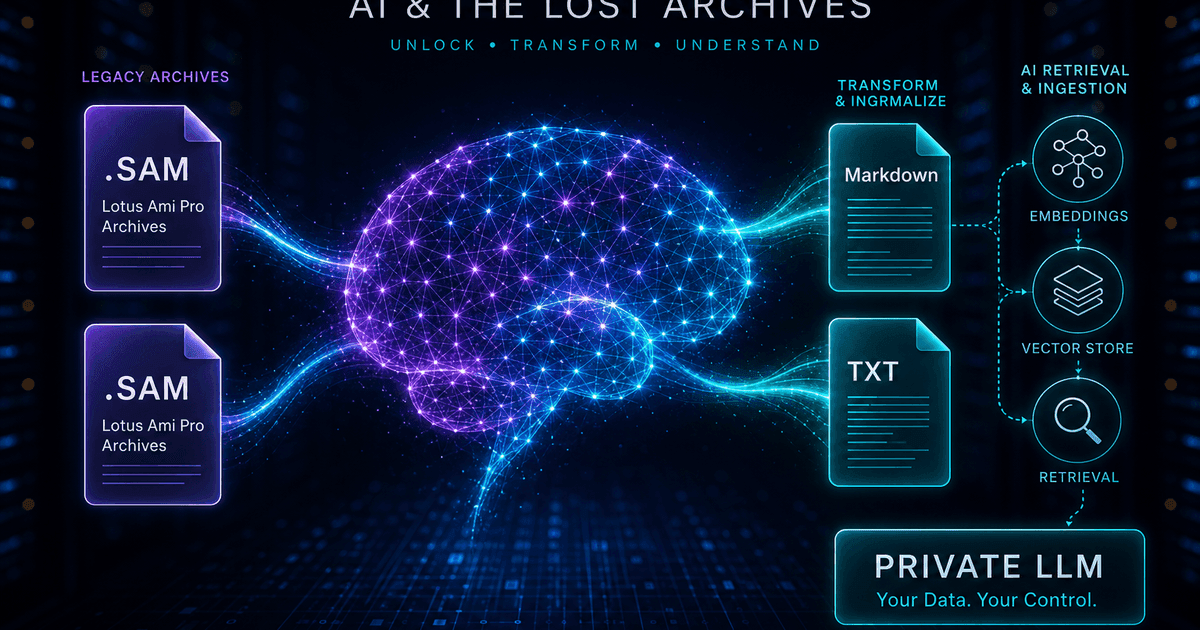
To a language model, your Ami Pro archive does not exist. Convert it to Markdown rather than PDF: headings survive as structure a chunker can split on, tables stay legible, equations arrive as LaTeX, and you avoid the extraction noise that PDF pipelines introduce. Chunk by heading, attach metadata for filtering, embed locally, and keep the whole pipeline offline — the same confidentiality that makes a private RAG system worth building applies to the conversion step. Start with Ami Pro Converter.
The invisible corpus problem
Organisations building internal AI assistants usually discover the same gap. The system answers questions about anything written in the last fifteen years and goes blank on anything older, because the older material is in formats no ingestion pipeline can read. For institutions that were using Ami Pro in the early 1990s, that can mean the entire founding period of a policy, product, or legal position is missing.
The consequence is more subtle than an incomplete index. A retrieval system that silently lacks historical context does not say "I do not have that"; it answers from what it has, confidently, and the answer omits the reasoning that shaped everything since. Nobody notices, because the gap is invisible from the outside.
Converting the legacy archive is therefore not a tidying exercise. It is the difference between an assistant that knows why decisions were made and one that only knows the current state.
Why Markdown, not PDF
The instinct is to convert everything to PDF because PDF is the archival default, and then run PDF extraction in the pipeline. This is the most common self-inflicted wound in RAG projects over legacy content, because you convert structure into layout and then pay to guess the structure back.
PDF extraction reintroduces every layout artefact as noise: column order confusion, running headers and footers appearing mid-paragraph, hyphenated line breaks splitting words, and tables collapsing into streams of numbers with no row or column association. The model then reasons over that mess.
Markdown goes the other way. Because Ami Pro documents carry explicit style information in their .STY sheets, headings can be emitted as real Markdown headings, lists as lists, and tables as pipe tables. Your chunker gets genuine structure, your embeddings get clean text, and you spend nothing on extraction heuristics.
A pipeline that works
1. Inventory the archive
Find every .sam file including uppercase .SAM variants, confirm the .STY style sheets are present, and record the count. Without style sheets your Markdown loses heading structure, which is the one thing you are converting for.
2. Convert to Markdown, and TXT for triage
Emit both in one pass. Markdown feeds the index; plain text gives you a fast way to grep the corpus, spot near-duplicates, and identify empty or template documents before you spend embedding budget on them.
3. Chunk by heading, not by character count
Fixed-size chunking cuts through the middle of arguments. Split on heading boundaries with a modest overlap so each chunk is a coherent unit, and carry the heading path into the chunk text so retrieval knows where it came from.
4. Attach metadata for filtering
Tag every chunk with source filename, document date, department, and folder path. Historical corpora make metadata filtering essential — "what did the 1996 policy say" is a filter plus a search, not a search alone.
5. Embed and index locally
Run a local embedding model and store vectors in pgvector, Chroma, Qdrant, or similar. If confidentiality is the reason you are building a private system, sending the corpus to a hosted embedding API undoes the premise.
What makes legacy documents special to index
Old documents are dense with references to things that no longer exist: superseded department names, discontinued product codes, former job titles, obsolete regulation numbers. A model cannot resolve those on its own, and a user asking a modern question will not use the historical vocabulary.
The cheap mitigation is a small glossary injected into the system prompt, mapping old names to current ones. It costs almost nothing and dramatically improves recall on a historical corpus.
The other characteristic is that legacy documents are often superseded but not marked as such. A 1994 procedure and its 2003 replacement look equally authoritative to a retrieval system. Date metadata plus an explicit instruction to prefer recent sources and to state the date of any historical answer prevents the most damaging failure mode: quoting a repealed policy as current.
Tables and equations in an AI pipeline
Tables are where format choice pays off most visibly. A Markdown pipe table keeps the association between a value, its column header, and its row label, so a model can answer questions about a specific cell. The same table extracted from a PDF is frequently a sequence of numbers with the headers detached — and a model asked to interpret it will guess.
Equations behave similarly. Recovered as rendered images they are invisible to text search and to the model; recovered as LaTeX they are searchable, embeddable, and re-renderable. For technical archives — engineering calculations, academic papers, actuarial notes — LaTeX extraction is what makes the corpus genuinely queryable rather than merely present.
Where a document is fundamentally visual, accept it. Convert it to PDF for human reading, index whatever text it does contain, and record in the metadata that the substance is graphical so retrieval can point a person at the original rather than pretending to summarise it.
Keep the whole pipeline offline
Most private RAG projects exist precisely because the material cannot go to a third party. It is worth noticing when the conversion step quietly breaks that rule: using a web-based converter to prepare documents for a system whose entire purpose is confidentiality is a contradiction that tends to survive because conversion is treated as plumbing rather than as processing.
A local desktop converter keeps the chain of custody intact from .sam file to vector store. Nothing is transmitted, so there is no transfer to assess or document, and the pipeline can run on an isolated workstation if that is what the material demands.
Pair that with a local embedding model and a self-hosted vector database and you have a system you can describe honestly in a compliance review: the corpus never left the network at any stage.
Why Markdown-first beats PDF-first for RAG
- Headings survive as structure, so chunking follows the document’s own logic
- Tables keep the header-to-value relationship that PDF extraction destroys
- Equations arrive as LaTeX — searchable and machine-readable, not pictures
- No OCR or layout-reconstruction stage, so fewer tokens and less noise
- The whole pipeline stays offline, preserving the confidentiality that justified it
Decades of context, finally queryable
The most valuable documents in an organisation are often the oldest ones, because they record why things are the way they are. Leaving them in a format nothing can read means your AI system knows the present and none of the reasoning behind it.
Convert the archive to Markdown with the style sheets applied, chunk by heading, tag with dates and departments, embed locally, and tell the model to be explicit about how old its sources are. The corpus goes from invisible to searchable, and it never leaves your network.
Convert your files
Related reading
Make your Ami Pro archive AI-readable
Free trial converts up to 10 .sam files to Markdown with LaTeX equation extraction — test your chunking before committing to the full corpus.
Free trial
Full app features — up to 10 files
Windows 10 or 11
Download the Windows installer for the full 10-file trial. Same app you unlock with a license — 100% local on your PC.